
Virtualization Architecture
Virtualization architecture is defined as a model that conceptually describes Virtualization. The application of virtualization in cloud computing is critical. End-users share data on applications known as clouds in cloud computing. End users, on the other hand, can share the entire IT infrastructure with Virtualization.
The Virtualization architecture is as follows:
.png)
Both services are integrated into either a virtual data center or an operating system. The virtual services are applicable to all platforms and programming environments. The services can be accessed via on-premise or off-premise clouds.
Third-party individuals provide virtualization services to cloud users. In exchange, cloud users must pay a monthly or annual fee to third-party individuals.
This fee is paid to third parties who provide cloud services to end users and also provide different versions of applications as requested by end cloud users.
The hypervisor is typically used to achieve virtualization. A hypervisor separates operating systems from the underlying hardware. It allows the host machine to run multiple virtual machines at the same time while sharing the same physical computer resources. There are two methods for achieving virtualization architecture, which is described below:
The first type of hypervisor is known as a bare-metal hypervisor. They run directly on top of the host system's hardware. They provide effective resource management and ensure that resources are always available. It gives you direct access to the hardware system, which improves scalability, performance, and stability.
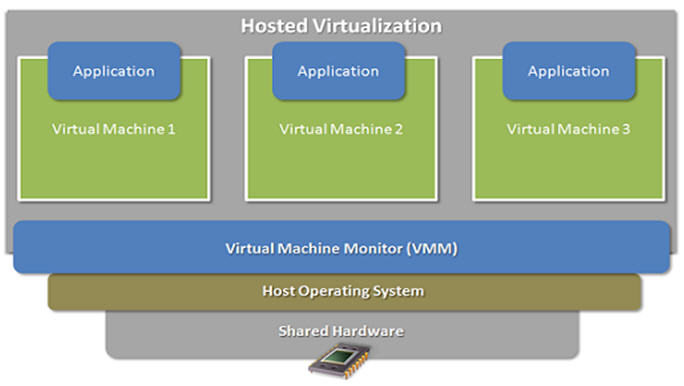
The hosted hypervisor is the second type of hypervisor. The virtual operating system runs directly above the hypervisor and is installed on the host operating system. It is the type of system that makes system configuration easier and simpler.
It also makes management tasks easier. The presence of the host operating system can limit the performance of the virtualized system and even create security flaws or risks.
The Benefits of Virtualization
Here are some advantages and disadvantages of virtualization:
Virtualization has several advantages, including cost reduction and increased productivity in the development process.
- It eliminates the need for a highly complex IT infrastructure.
- It allows for remote access to resources and promotes faster scalability.
- It is extremely adaptable, allowing users to run multiple desktop operating systems on a single standard machine.
- It eliminates the risks associated with system failures while also enhancing flexible data transfer between different virtual servers.
Virtualization's working process is highly streamlined and agile, ensuring that users work and operate as efficiently as possible.
Virtualization's Drawbacks
The disadvantages of virtualization are relatively minor. Here are the disadvantages and disadvantages of virtualization:
- The transition from the existing hardware setup to a virtualized setup necessitates a significant time investment, making this a time-consuming process.
- There is a scarcity of skilled resources to assist in the transition of existing or actual setup to virtual setup.
- Because of the limitation of having fewer skilled resources, the implementation of Virtualization necessitates high-cost implementations.
- If the transition process is not handled meticulously, sensitive data may be compromised.
Virtualization's Role in Cloud Computing
A sensible or proper name is associated with the physical server in virtualization. The pointers are then directed towards that physical server on demand. Virtualization makes it easier to run homogeneous applications.
It also supports virtual and isolated networking, storage, and memory area environments. Virtualization is accomplished by using a host machine and a guest machine. A host machine is a machine on which a virtual machine is created, and the virtual machine created is known as a guest machine.
Hardware virtualization is critical in delivering infrastructure as a service solution in the most efficient and effective way possible during the Cloud Computing process.
The portability of this type of virtualization is ensured. The guest machine is packaged as a virtual instance of an image, and such virtual images are easily removed as needed.
Important Virtualization Terminologies
Virtualization relies on a few key technologies, which are as follows: -
- A virtual machine is a computer of a virtual type that operates under the supervision of a hypervisor.
- The operating system that runs on actual hardware is referred to as a hypervisor. The operating system's virtual counterpart is a component that executes or emulates the virtual process. Domain 0 is also known as Dom0.
- Containers: These are lightweight virtual machines that are a subset of the same operating system instance or hypervisor. They are a collection of processes that execute with corresponding namespaces or process identifiers.
- Virtual network: This is a network that has been logically separated and is present within the servers. These networks can be expanded to include multiple servers.
- Virtualization software: This type of software aids in the deployment of Virtualization on computer devices.



.png&description=Architecture of Virtualization)
0 Comments